
Cmd+Shift+O (or Query > Quick Switcher) in a connection window to open a floating search panel. Type a few characters and press Return to jump to any table, view, system table, database, schema, saved query, or recent query. Matching is fuzzy: usr finds users and user_settings, and matched characters are shown in bold.

The Quick Switcher with fuzzy-matched results
Keys
The opening shortcut is rebindable in Settings > Keyboard; see Keyboard Shortcuts.
Scopes
Five scopes limit what the search covers: All (Cmd+1), Tables (Cmd+2, includes views and system tables), Databases (Cmd+3, includes schemas), Queries (Cmd+4, saved queries and recent queries), and Connections (Cmd+5). Round buttons beside the field set the scope; they show while the field is empty and nothing is listed. Once the list fills, the active scope moves to a badge in the bar. Click the badge to return to All. With an empty search in a scope other than All, everything in that scope is listed under section headers. The database list follows the sidebar’s database filter.
Saved queries come from your favorites and also match on their keyword. In the All scope, recent queries are the last 50 entries from query history for the current connection.
Search Across Connections
Objects
The Connections scope searches tables, views, and system tables in every connected window. With an empty search the list is grouped under each connection’s name. Once you type, results are ranked across all connections in one list, and every row shows the connection, database, and schema it belongs to. Search matches both the object name and that path, so typing a connection name limits the results to that connection. TablePro loads this catalog only when you open the Connections scope. It searches the database or schema each connection is currently browsing. Opening a result in another connection brings that connection’s window forward and opens the table there.Queries
The Queries scope searches saved queries and up to 200 recent query-history entries drawn from every connected window. Each connection contributes its own most recent entries, so a connection you ran hundreds of queries on today cannot push another one off the list. Each row shows its connection and database. Recent queries also show their execution time. Global saved queries open in the connection where you opened Quick Switcher. The connection the panel was opened from stays listed even while it is reconnecting.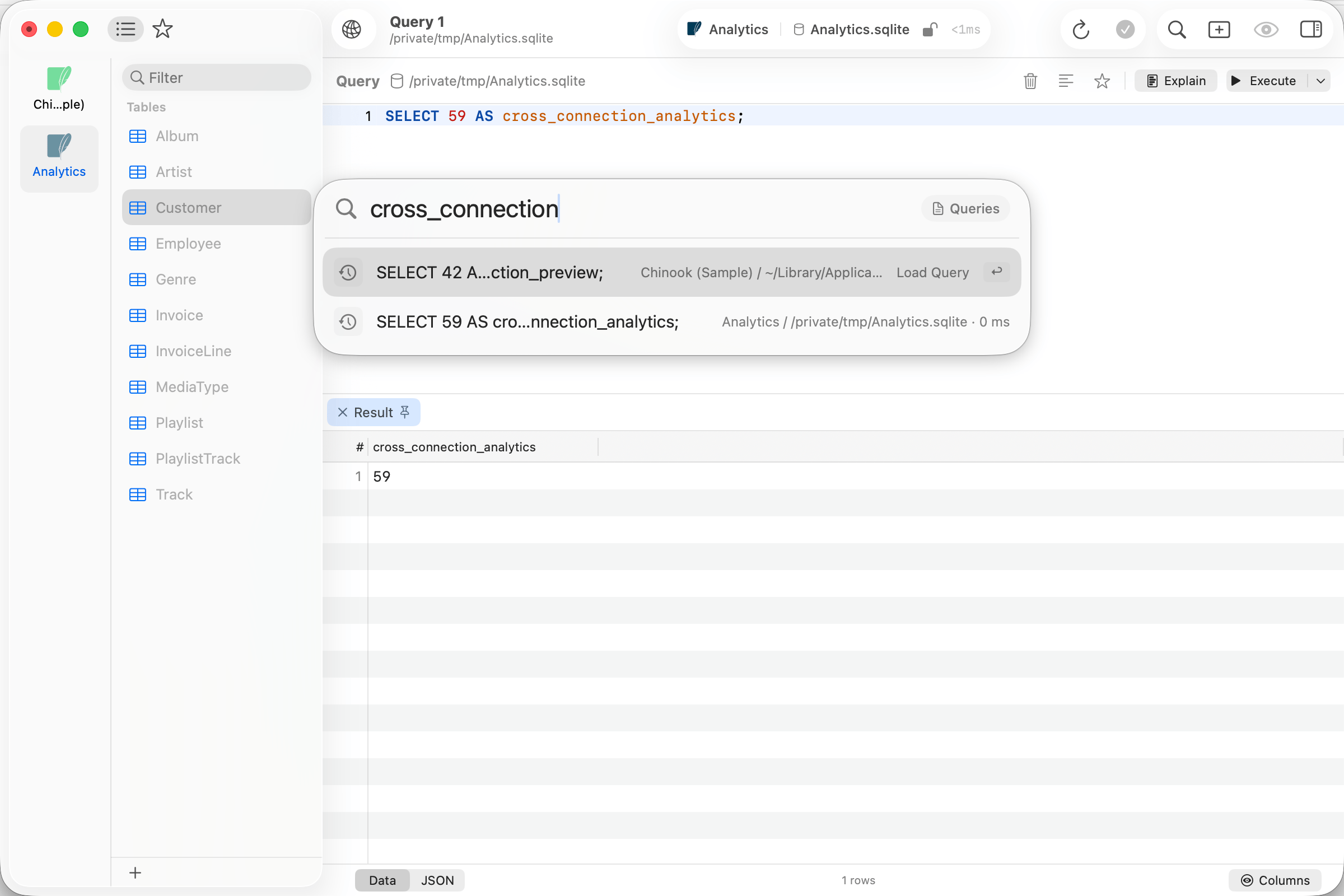
Query history results from two open connections
Option+Return always opens a new tab.
Ranking
With an empty search, the panel shows a Recent section: the last 10 items you opened through the switcher on this connection. With a query, each result’s fuzzy match score is weighted by:- Object kind: tables rank above views, databases, schemas, and saved queries; query history ranks last.
- Frecency: each item’s last 10 opens through the switcher, weighted by how recent they are, tracked per connection. Opening another connection’s result counts towards that connection.
- Open tab boost: tables already open in a tab rank higher.
- Where the match landed: a match on the name ranks highest, then a saved query’s keyword, then the connection and database path shown beside it.
Open badge
Tables already open in a tab show an Open badge, and the selected row’s hint reads Switch to Tab. Committing switches to the existing tab instead of opening a duplicate.Option+Return forces a new tab.
What opening does depends on the item: tables and views open a table tab, databases and schemas switch the active database or schema, and queries load into the SQL editor.
Right-click actions
Open Structure is available only for objects in the current connection.